
I haven't talked much about the technical guts of SaferPDF.com yet, but it's a project born out of a specific need for privacy-first PDF tools. Architecturally, however, it's a bit of a beast to maintain. It's a hybrid: a Hugo static site handles the marketing and SEO, while a React SPA handles the actual PDF processing in the browser using WebAssembly.
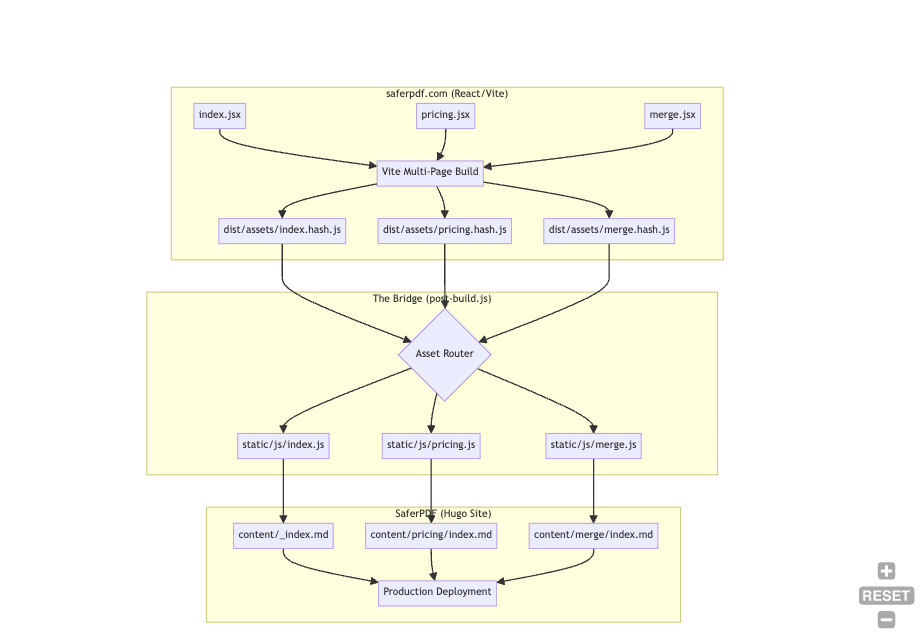
This two-folder setup is great for performance and "getting the best of both worlds", but adding features is cumbersome. It requires navigating a build-time bridge where React assets are compiled, hashed, and then injected into Hugo templates via a custom post-build.js script.

To see if I could automate this plumbing, I put Oh My Open Code to the test. I tasked it with building a brand-new PDF Merge feature from scratch.
What is Oh My Open Code?
If you are familiar with the developer ecosystem, you have likely heard of OpenCode. Oh My Open Code is one of the specialized orchestration layer that sits on top of it.
While standard tools might struggle with separate repositories and complex build scripts, Oh My Open Code uses a modular workflow to handle the load. It assigns specialized tasks to different processes: one to plan the architecture, one to write the React logic, and another to manage the build-time integration. This allows them to work in parallel on the same project.
Installation
Getting it running is straightforward if you have the OpenCode CLI:
- Install OpenCode:
curl -fsSL https://opencode.ai/install | bash - Add the Oh My Plugin: Once your API keys for Claude or Gemini are set, inject the orchestrator:
bunx oh-my-opencode install - Launch: Run
opencodein your project directory to let the agents start indexing your project structure.
The Challenge: the repo structure
The difficulty with the PDF Merge feature was not the UI; it was the plumbing. The tool had to understand that for a feature to be live, it had to move through several layers:
- React Source: Create
src/main-merge.jsxand in - Integrate it with the Ghostscript WASM logic.
- Vite Config: Register the new entry point so the bundler generates a dedicated
merge.[hash].jsfile. - The Bridge: Update
post-build.js(my custom integration script) to recognize the new hash and copy it into the Hugo directory. - Hugo Content: Create a new Markdown page at
/content/english/merge/index.mdwith the correct React root div and the dynamically injected script tags.
Real-World Performance: 500k Tokens in 90 Minutes
I gave the orchestrator its mission: "Create a PDF Merge feature as a separate page, respecting the existing build pipeline."
In just 1.5 hours, the tool consumed 500,000 tokens (which is less that Claude Code or similar). It spent that time thinking through the relationship between the two folders and two git repos, ensuring that a change in the React source did not break the Hugo deployment.
What Worked
- Deep Architectural Awareness: it did not just write code; it understood the relationship between my folders and repos. It correctly identified that it needed to touch the Vite config and the Hugo Markdown files simultaneously.
- Commit Discipline: It managed the feature branch and commits flawlessly, keeping the work isolated from the main site until it was ready.

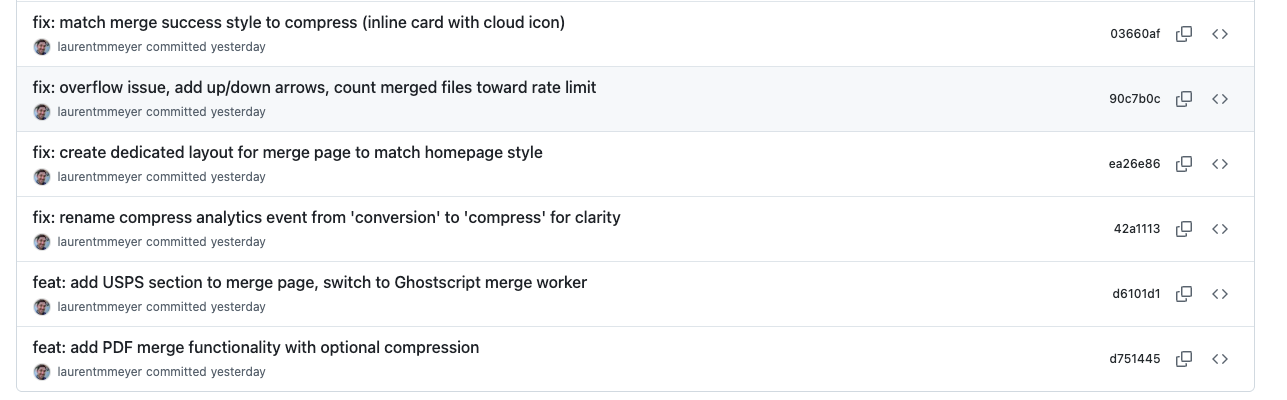
- Speed: What usually takes me a full afternoon of manual path-debugging was handled in a single supervised session.
The Friction Points
It was not a perfect set and forget run. I hit a few technical hitches:
- The API Fallback: I hit my Claude Pro credit limit mid-session. Even though I had my Gemini key in the tool, it did not automatically switch over to it; I had to... wait and I played with the kids meanwhile.


- Library Logic: The tool initially tried to use
qpdffor merging (because I used it somewhere else). Since SaferPDF is standardized on Ghostscript (gs.wasm) for high-fidelity processing, I had to manually steer it back to the existing library. - UI Polish: A few icons were missing from the generated Tailwind components, requiring a quick manual fix before going live.
Final Verdict
The PDF Merge feature is now live (go check it out). Despite the cumbersome setup of the two repositories, Oh My Open Code proved it can navigate the plumbing of a project, not just the painting. I think it would’ve taken me 6-8 hours to code manually, and I definitely would’ve sworn a lot because of how cumbersome the build system is.
If you are dealing with a project where adding a button actually means updating three configs and a build script, this multi-agent approach is a significant time-saver. It is no longer just about basic coding; it is about having a structural assistant that understands your build pipeline.